
Upwork in Mexico: How to Get Paid and Withdraw Your Money (2026)
How to get paid on Upwork from Mexico: a 0–15% fee, 2.5% income tax withheld with an RFC (20% without), VAT by client location, and the five ways to withdraw to your bank, with costs.

Upwork works in Mexico without restrictions: your clients pay in dollars and you withdraw to your bank in pesos for US$0.99 per withdrawal, or to a US account, by US-dollar wire, PayPal or Payoneer. The withdrawal is the cheap part. What weighs more happens before it: Upwork charges a service fee of 0 to 15% per contract, plus VAT on that fee, and as a platform operating in Mexico it has to withhold income tax (ISR) from your gross payment. With a valid RFC, the withholding is 2.5%. Without one, it's 20%.
That 20% is the most expensive mistake a Mexican freelancer makes on Upwork, and it takes ten minutes to fix with your Constancia de Situación Fiscal. This guide explains how to get paid on Upwork from Mexico under the rules in force in November 2026: what gets deducted and in what order, how much of a US$1,000 payment arrives, which withdrawal method makes sense, and what changed this year. The figures come from Upwork's pricing pages and help center, updated in late October 2026, and from Mexico's 2026 Federal Revenue Law.
What Upwork is and how it works from Mexico
Upwork is a freelance marketplace with over 18 million freelancers in 180 countries, by its own count: companies, mostly in the United States, post projects and hire freelancers by the hour or at a fixed price. From Mexico you can sign up, send proposals and get paid as in any other country. The platform and its help center are in English; there's no Spanish version of Upwork, though you can work with Spanish-speaking clients.
The money always follows the same path. Your client pays, Upwork holds the payment and releases it to your balance, which is always in US dollars:
- Hourly contracts: each week's hours (Monday to Sunday) are released ten days later, on the following Wednesday.
- Fixed price: five days after the client approves the milestone.
From that balance you withdraw to your bank or another account. Before your first withdrawal, Upwork asks you to fill in your tax information and add a withdrawal method, which activates three days later for security. The account holder's name has to match your verified name on Upwork.
What Upwork deducts in Mexico
Four lines come out of each payment before you withdraw it:
| Deduction | How much | Applied to |
|---|---|---|
| Freelancer Service Fee | 0 to 15%, fixed per contract | Your gross payment |
| VAT on the fee, Connects and membership | 16% | What you pay Upwork |
| Income tax (ISR) withholding | 2.5% with a valid RFC; 20% with no RFC or a rejected one | Your gross payment, before the fee |
| VAT withholding on your earnings | 0% if you're an individual and your client is outside Mexico; 8% or 16% otherwise | Your payment |
The service fee isn't flat: Upwork sets it per contract, between 0 and 15%. You see it before you submit a proposal or accept an offer, and it doesn't change for the life of the contract. Upwork's own example: with a 10% fee, a US$500 invoice leaves you US$450.
The income tax withholding is the line that changed most. Until 2025, platforms withheld 1% from individuals providing services through them; Mexico's 2026 Federal Revenue Law (article 25) raised it to 2.5% and extended it to businesses. Upwork applies it to every freelancer with a tax address in Mexico, individual or business, and calculates it on what you bill the client, not on what's left after the fee. If you don't provide your RFC, or it doesn't match the SAT's records, the withholding is 20%.
VAT on your earnings depends on where your client is. If you're an individual and your client is abroad, which is most cases, the withholding is 0%. If your client is in Mexico, Upwork withholds 8% with a valid RFC and 16% if you have no RFC or your withdrawal account isn't at a Mexican bank. If you get paid as a business, the client's location doesn't matter: always 8% with a valid RFC, 16% without one or with a withdrawal account outside a Mexican bank. Upwork counts PayPal and Payoneer as accounts outside a Mexican bank.
A US$1,000 payment, line by line
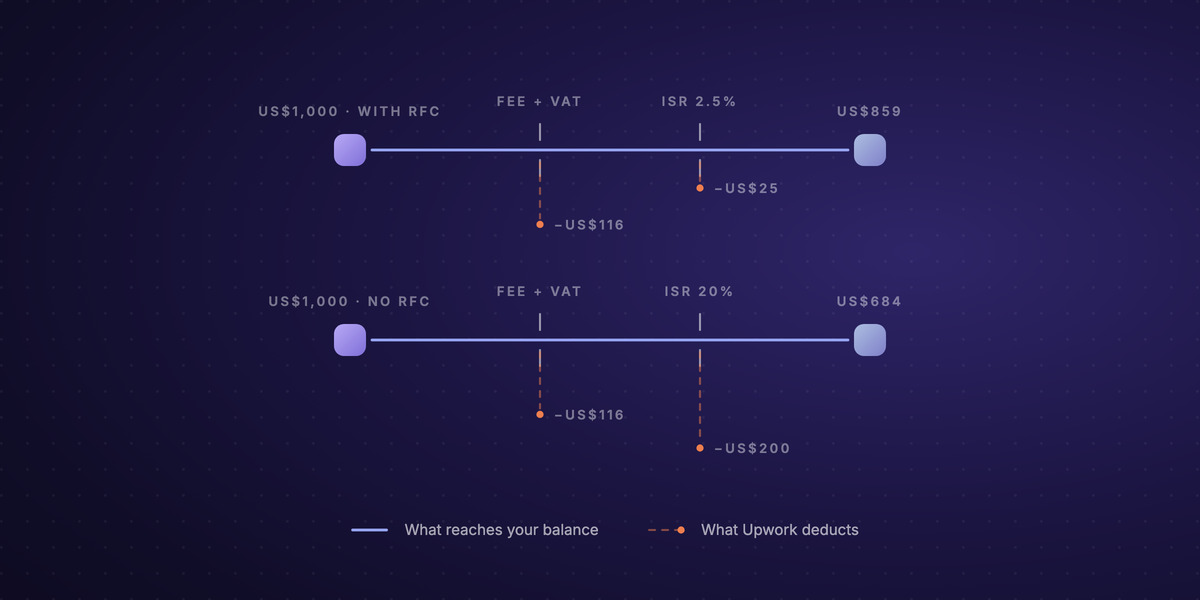
A US client pays you US$1,000 on a contract with a 10% fee:
| With a valid RFC | No RFC | |
|---|---|---|
| Client payment | US$1,000 | US$1,000 |
| Upwork fee (10%) | −US$100 | −US$100 |
| VAT on the fee (16%) | −US$16 | −US$16 |
| Income tax withholding | −US$25 (2.5%) | −US$200 (20%) |
| VAT on your earnings (client abroad) | US$0 | US$0 |
| Reaches your balance | US$859 | US$684 |
Then comes the withdrawal: US$0.99 if you withdraw pesos to your bank, plus the exchange-rate margin. The gap between the two columns, US$175 on a single payment, has nothing to do with how you withdraw.
How to add your RFC on Upwork
- Have your Constancia de Situación Fiscal at hand. Upwork validates your RFC against the SAT's records together with your name and postal code, so all three have to be written exactly as on the certificate.
- Go to Manage Finances › Tax information and enter your RFC: 13 characters for an individual, 12 for a business.
- Sign the certifications electronically and save.
While your RFC is under review ("pending"), Upwork already treats it as valid for VAT. If the SAT rejects it, the income tax withholding goes back to 20%. If you change your name or tax address, you may have to validate it again.
How to withdraw your money from Upwork in Mexico
Upwork offers five withdrawal methods for Mexico:
| Method | Upwork fee | Timing | What you receive |
|---|---|---|---|
| Direct to Local Bank (pesos to your CLABE) | US$0.99 per withdrawal | Up to 4 business days | Pesos, at the rate of Upwork's payment partner |
| Direct to U.S. Bank (ACH) | US$2.99 per withdrawal since September 1, 2026 | 2 to 5 business days | Dollars in a US account in your name |
| US-dollar wire transfer | US$50 per wire | Up to 7 business days | Dollars in your USD account; your bank charges to receive it |
| PayPal | A per-transfer charge Upwork shows when you set it up | Usually instant, up to 24 hours | PayPal balance |
| Payoneer | A per-transfer charge Upwork shows when you set it up | Usually within 24 hours | US-dollar balance at Payoneer |
Direct to Local Bank: pesos to your Mexican bank
This is the route that suits almost everyone. You add your CLABE, the minimum withdrawal is US$5 and the money arrives within four business days; request it before 12:00 UTC (6:00 a.m. in central Mexico) and it's processed the same day. What the US$0.99 fee doesn't show is the exchange rate: the dollar-to-peso conversion is done by one of Upwork's payment partners, and Upwork itself says it may include a markup over the interbank rate. Compare the rate it shows you with Banxico's FIX for the day before you confirm.
Direct to U.S. Bank: dollars to a US account
It works with any US account that accepts ACH, in your name. Until August it was free for everyone; since September 1, 2026, it costs US$2.99 per withdrawal if your tax address is outside the US. Withdrawing weekly, that's over US$150 a year. It makes sense if you already have a US dollar account and want your dollars to stay dollars.
US-dollar wire, PayPal and Payoneer
The US-dollar wire costs US$50 per transfer, and your Mexican bank also charges to receive it (US$17 to US$30 plus VAT at the big banks). It only makes sense for large amounts and if you have a dollar account.
PayPal and Payoneer receive the money within hours, but they're an intermediate step: you still have to turn the dollars into pesos and withdraw them to your bank. Payoneer charges around 2% to withdraw pesos to a Mexican bank (its published range is 1.2 to 4%), and PayPal applies its own margin when converting. If you have clients in Mexico, note this: with PayPal or Payoneer as your withdrawal method, Upwork withholds 16% VAT instead of 8%. Payoneer's costs on a small payout are broken down in what a $100 payout via Payoneer really costs.
What changed on Upwork in 2026
- Income tax withholding from 1% to 2.5% for individuals, under Mexico's 2026 Federal Revenue Law; businesses now face a 2.5% withholding too.
- US$2.99 per withdrawal to a US account for freelancers with a tax address outside the US, since September 1, 2026.
- VAT shown on every purchase. Upwork charges 16% VAT on its fee, Connects (US$0.15 each) and the Freelancer Plus membership (US$19.99 a month), and shows it on your invoices and transactions.
Your clients outside Upwork
Upwork is hard to replace for finding clients. But not all your clients come from there, and its terms are clear: a client you met on Upwork stays on Upwork for two years, unless they pay the Conversion Fee, 13.5% of what you'd earn from them in a full-time year. For the clients you brought yourself, or the ones already on a direct contract, you don't need a platform in the middle. You need a way to get paid in dollars. That's what we build at Localbridge, and this is the only block in this article about us.
Localbridge opens individual accounts for freelancers, made for getting paid by companies, and business accounts. A virtual account gives you local payment details in USD, EUR, GBP, MXN, BRL and COP, so your client in Texas pays you by ACH as they would a local supplier. Each payment converts automatically into USDC or USDT, digital dollars you can keep, send to a bank account or move to your own wallet. When you need pesos, you convert the amount you want and receive it by SPEI in your own CLABE, at a rate you see before you confirm. There's no fixed fee per incoming payment: you pay a percentage of what you convert, published on the pricing page. Localbridge never holds your funds; accounts and conversion run on regulated partner infrastructure, and the pesos always go to your own bank account. As on Upwork, the income gets invoiced and declared.
Every route for getting paid from Mexico, with costs and timing, is in our guide to receiving international payments in Mexico.
FAQ
Does Upwork work in Mexico? Yes. You can sign up, work and get paid from Mexico without restrictions. Your balance is in US dollars and you can withdraw it to your bank in pesos, to a US account, by US-dollar wire, PayPal or Payoneer.
How do I get paid on Upwork from Mexico? Fill in your tax information with your RFC, add a withdrawal method (most commonly Direct to Local Bank with your CLABE) and wait three days for it to activate. Payments are released ten days after each week on hourly contracts, and five days after approval on fixed-price contracts.
How much does Upwork charge in Mexico? A service fee of 0 to 15% per contract, plus 16% VAT on that fee. Separately, it withholds 2.5% income tax on your gross payment with a valid RFC (20% without one) and, if your client is in Mexico, 8% or 16% VAT. Withdrawing pesos to your bank costs US$0.99.
Do I have to give Upwork my RFC? Not to work, but without a valid RFC Upwork withholds 20% income tax instead of 2.5%, and you may not be able to credit the VAT withheld on your return.
What's the best way to withdraw money from Upwork in Mexico? For most people, Direct to Local Bank: US$0.99 per withdrawal and pesos in your CLABE within four business days. Compare its exchange rate with Banxico's FIX. If you want to keep dollars, a US account (US$2.99 per withdrawal) or Payoneer.
Is Upwork available in Spanish? No. The platform and the help center are in English. You can write your profile and proposals in Spanish and work with Spanish-speaking clients, but the menus and terms are in English.
How do I get paid on Upwork from Argentina or Peru? Direct to Local Bank also exists in Argentine pesos (with a US$3,000 limit) and Peruvian soles. In Argentina many freelancers withdraw through Payoneer; the costs are in Payoneer in Argentina.