
Payoneer in Brazil: How to Get Paid, Withdraw, and What It Costs (2026)
How Payoneer works in Brazil: where to find the bank details, the 1% fee to receive in dollars and 1.2%–4% to withdraw in reais, and how to pay another Payoneer user.

Payoneer works in Brazil for people who get paid by companies and platforms abroad: you get bank details in dollars, euros and other currencies, the client pays as if you were a local supplier, and you withdraw the balance in reais to your account in Brazil. The cost comes in two steps. Receiving into a dollar receiving account costs 1% (minimum US$1), because the dollar is not your local currency, and withdrawing to your bank with a conversion costs 1.2% to 4%, built into the exchange rate. If you receive less than US$6,000 in 12 months, there is also an annual fee of US$29.95.
This post answers what people ask most about Payoneer in Brazil: what the "bank number" is, how to withdraw, how to pay another person, how to add funds, and what all of it costs. The numbers come from Payoneer's pricing page (updated January 1, 2026) and its Portuguese help center, checked on November 16, 2026. The exact fee for your account is shown in the fees section inside Payoneer.
What Payoneer is and how it works in Brazil
Payoneer is a US payments company that gives freelancers and businesses receiving accounts in other countries. Marketplaces and platforms such as Upwork, Fiverr and Amazon pay straight into your balance, direct clients pay by bank transfer, and from the balance you withdraw to your bank, pay suppliers or use the card.
Two limits define the service, and both are in Payoneer's help center:
- It is for commercial activity. Payments through Payoneer are for business transactions, such as paying suppliers and contractors. Personal goods and services are excluded.
- Only companies can pay into your receiving accounts. Transfers from personal accounts are rejected. If your client is an individual, the receiving account will not work for them.
What is the Payoneer bank number
There is no single "Payoneer bank number". Each receiving account has its own details, issued by a partner bank in the currency's country: an account number and routing number in the United States, an IBAN in the euro area, a sort code in the United Kingdom. The issuing bank varies from customer to customer and, as a rule, cannot be changed once assigned.
To see the details:
- On the website: sign in, open the Receive tab and select Receiving accounts. Click the account for the currency you want.
- In the app: tap one of your balances and then the Receiving accounts tab. The Share button sends the details to your client.
Give the payer every detail listed, including the exact beneficiary name: a mismatched name can get the payment rejected. Receiving accounts exist in dollars, euros, pounds, Canadian dollars, Australian dollars, yen and other currencies. They are for receiving only: they cannot be debited, and debit requests are declined.
Local transfers and wires usually reach your balance one to three business days after they are sent. On an international wire (SWIFT), intermediary banks may deduct US$20 to US$30 on average along the way, and Payoneer does not control that amount.
Payoneer fees for users in Brazil
| Operation | Fee |
|---|---|
| Receiving into a receiving account in a currency that is not yours (USD, EUR, GBP) | 1%, minimum US$1 |
| Receiving from another Payoneer customer's balance | Free |
| Receiving from marketplaces and integrated platforms | Set by each platform |
| Charging a client by credit card | Up to 3.99% + US$0.49 |
| Withdrawing to a bank account with currency conversion | 1.2% to 4%, inside the exchange rate |
| Converting between your Payoneer balances | 0.5% |
| Annual account fee | US$29.95, if you receive less than US$6,000 in 12 consecutive months |
| Payoneer card | US$29.95 annual fee; ATM withdrawal US$3.15 plus up to 1.8% |
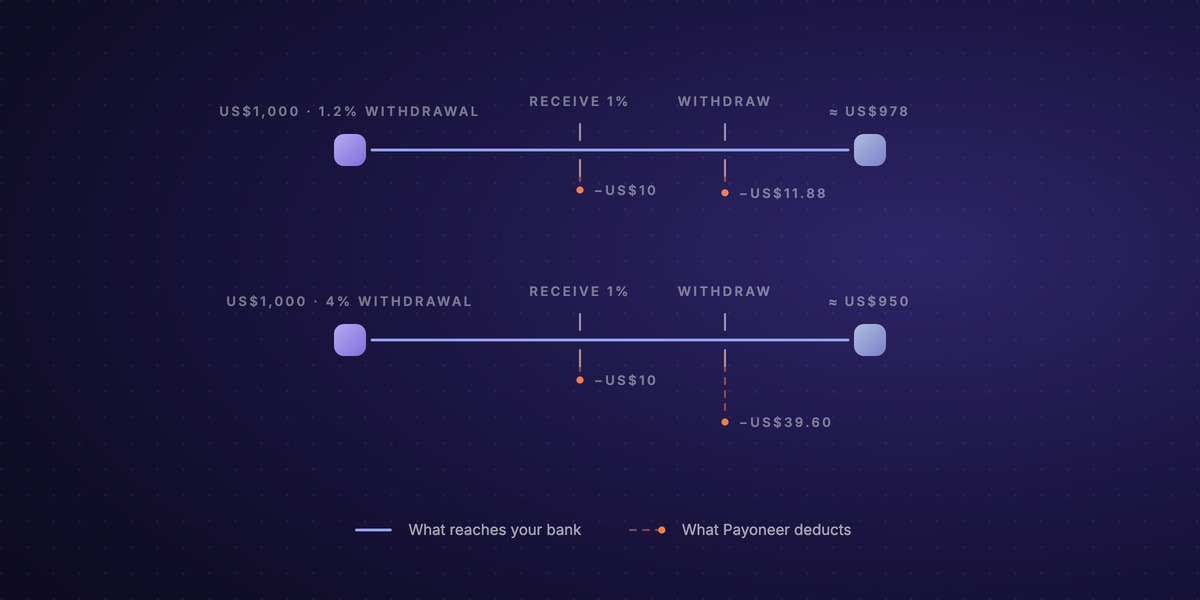
In numbers: a client pays US$1,000 by bank transfer into your dollar account. Payoneer deducts US$10 on the way in. On withdrawing the US$990 to reais, the 1.2% to 4% fee takes US$11.88 to US$39.60. The equivalent of roughly US$950 to US$978 reaches your bank, at the market rate of the moment. The pricing page gives the range; the percentage for your account appears in the withdrawal summary before you confirm.
How to withdraw from Payoneer to a Brazilian bank
- Add the bank account under Manage › Your bank accounts. The account has to be in the same name as the Payoneer account: yours if you are an individual, or the company's. Review of a new account takes up to three business days.
- Open Withdraw › To Bank Account, choose the balance and the destination account.
- Enter the amount to withdraw or the amount you want to receive; the other field is calculated on the spot. The minimum and maximum per transaction are shown under each field.
- Click Review, then Withdraw. The summary shows the rate with the fee already included.
The money usually arrives two to three business days after the confirmation email. One notice from Payoneer itself for Brazil: on withdrawals in reais to Brazilian banks, you may be asked for documents to meet local banking rules. Answer quickly, because the withdrawal waits until you do. If the bank details are rejected, the amount returns to your balance, which can take up to 14 business days.
How to make a Payoneer transfer to another person
You can pay another Payoneer customer with just their email:
- Sign in and select Pay › Pay to a recipient's Payoneer account.
- Enter the recipient's email, the balance to pay from and the balance to pay to.
- Enter the amount, choose the purpose of the payment and confirm.
The payment usually arrives within two hours. Three conditions catch many people out:
- You must have received at least US$500 into your account before you can pay other Payoneer customers, and payments from other Payoneer customers do not count toward that amount.
- The payment has to be commercial. Payoneer is not a service for sending money to family.
- There is no way back. Payments between Payoneer accounts are non-refundable and non-reversible.
Receiving from another Payoneer customer's balance is free. For the sender, the fee varies by country, currency and amount, and is shown on screen before you confirm. You can also pay the bank account of someone who does not use Payoneer, under Pay › Pay to a recipient's bank account; that payment takes one to two business days.
How to add funds to Payoneer
A Payoneer balance grows when someone pays you. Depositing your own money is the exception: Payoneer opens the add-funds function only to accounts registered as a company, with a receiving account issued by Citibank in dollars, pounds, euros or Australian dollars, and after an approval that takes up to three business days. If your account is eligible, the Add funds link appears on the balance page. If it does not, there is no way to add funds yourself, and a transfer from your personal account to your receiving account will be rejected.
When Payoneer is not the best option
Payoneer is hard to replace if you are paid by marketplaces that only pay through it. For direct invoices to clients, the cost adds up: 1% to receive, 1.2% to 4% to withdraw, and the annual fee if your volume is low. The effect of fixed fees on small amounts is broken down in what Payoneer takes from a US$100 payout.
Another route is the one we built at Localbridge, and this is the only block in this post about us. Localbridge serves Brazilian companies. A virtual account gives your company local receiving details in USD, EUR, GBP, MXN, BRL and COP: the client in New York pays by ACH, the one in Berlin by SEPA. Each payment is converted automatically into USDC or USDT, digital dollars the company can hold, use to pay suppliers or convert to reais, settled by Pix to an external bank account, the company's own or that of whoever it needs to pay. A reais balance does not exist inside Localbridge: converting always means settling to a real bank account, and you see the rate before you confirm. There is no fixed fee per incoming payment; the fees are on the pricing page.
Every route for bringing revenue in from abroad, with costs and timing, is in the guide to receiving international payments in Brazil.
FAQ
Does Payoneer work in Brazil? Yes. Freelancers and companies in Brazil can open an account, get paid by platforms and companies abroad and withdraw in reais to a Brazilian bank. The service is for commercial activity, not personal payments.
What is Payoneer? An international payments company. It gives you bank details in other countries to get paid by clients and platforms, holds the balance in foreign currency and lets you withdraw to your bank.
What is the Payoneer bank number? There is no single number. Each receiving account has its own details, which you find in the Receive tab under Receiving accounts. The issuing bank varies from customer to customer.
What are Payoneer's fees? 1% (minimum US$1) to receive into a dollar, euro or pound receiving account, 1.2% to 4% to withdraw with conversion, 0.5% to convert between balances, and US$29.95 a year if you receive less than US$6,000 in 12 months. Receiving from another Payoneer customer is free.
How do I withdraw from Payoneer? Add a bank account in your name, open Withdraw › To Bank Account, choose the balance and the amount and confirm. The money usually arrives in two to three business days; on withdrawals in reais, Payoneer may ask for documents.
How do I make a Payoneer transfer to another person? Under Pay › Pay to a recipient's Payoneer account, with the recipient's email. You must have received at least US$500 into your account, and the payment has to be commercial.
How do I add funds to Payoneer? As a rule, you cannot: the balance comes from payments by clients and platforms. The Add funds function exists only for eligible company accounts, with a Citibank-issued receiving account and prior approval.
Does the Payoneer card have a cost? The pricing page lists a US$29.95 annual fee and ATM withdrawals at US$3.15 plus up to 1.8%. Whether the card is offered depends on your account; check your dashboard.
How do I log in to Payoneer? Through Payoneer's website or app, with your email and password. If two-step verification is on, you get a code each time you sign in.